

Overview
e-Reporting is required for multiple country mandates, such as France https://www.dynatos.com/solution-themes/the-french-e-invoicing-mandate/ .
For these reports an aggregated report for a specific period must be supplied on a set schedule.
To allow for Routty Cloud customers to comply to these requirements two approaches are supported:
-
Direct: The customer sends the final report document to Routty Cloud, which forwards it to the compliance platform.
-
No scheduling is performed by Routty Cloud.
-
No aggregation is performed by Routty Cloud.
-
The customer is responsible for generating the final report.
-
-
Indirect: The customer sends individual reporting events or partial reports to Routty Cloud.
Routty Cloud stores these partial reports and, based on a configured schedule, aggregates them into a single report before forwarding the resulting report to the compliance platform.
-
Scheduling is performed by Routty Cloud.
-
Aggregation is performed by Routty Cloud.
-
The customer only needs to submit reportable events.
-
Mandate-specific reporting schedules can be configured centrally.
-
Since reporting schedules and requirements may differ between mandates, this page describes the indirect e-Reporting process at a high level. Without going into mandate-specific details, it explains how indirect e-Reporting can be configured and used within Routty Cloud.
Core Concepts
Partial Report
A partial report contains a subset of the information required for a final compliance report.
Examples:
-
A single transaction summary
-
A payment event
-
A tax reporting event
-
A correction event
Partial reports are stored in Routty Cloud until they become part of a scheduled aggregation run.
e-Report / Aggregated report
An aggregated report is the final report generated by Routty Cloud by combining one or more partial reports that belong to the same reporting period.
The generated report is subsequently forwarded to the configured compliance platform.
Connector Configuration
A Connector Configuration defines how indirect e-Reporting reports are delivered and which Report Type should be used for aggregation.
A Connector Configuration contains:
-
Compliance Connection
-
Report Type
-
Next Report Fire Time
Partial reports assigned to the same Connector Configuration are aggregated together.
Report Type
A Report Type defines how indirect e-Reporting reports are aggregated.
A Report Type contains:
-
Report Schedule
-
Report Header Template
-
SBDH Template
-
Output Format
-
Time Zone
A Report Type can be used by one or more Connector Configurations.
Routes determine which Connector Configuration should be used for a document.
For example, a Route Configuration may inspect:
Invoice/ext:UBLExtensions/ext:UBLExtension/ext:ExtensionContent
    /rou:InvoiceMandates
    /rou:France
    /rou:eReporting
    /rou:ReportType
and route:
<rou:ReportType>TransactionReport</rou:ReportType>
to one Connector Configuration while routing:
<rou:ReportType>PaymentReport</rou:ReportType>
to another.
Report & SBDH Templates
These templates are configured on the Report Type and combine a mapping, with the enriched-input.xml RouttyDocument from the first of the matched partial report. This way the sender and the recipient can be set dynamically based on XML contents of the documents.
Default and custom Report Types can be configured with different Report Header and SBDH mappings.
Report Schedule
A report schedule defines when Routty Cloud should generate and submit an aggregated report.
Schedules are attached to a specific Report Type and are evaluated using the Time Zone configured on the Report Type.
A Report Type may contain multiple schedules. Each schedule may generate multiple reporting triggers.
Examples:
|
Schedule Type |
Example |
|---|---|
|
Weekly |
Every Monday |
|
Monthly |
Every month |
|
Every N Months |
Every 2 months |
|
Fixed Days in Month |
10th, 20th and last day of month |
|
Custom Cron-like Schedule |
Mandate-specific configuration |
Report Trigger
A report trigger represents a single execution of a report schedule.
When a trigger fires, Routty Cloud executes the aggregation workflow configured for the Connector Configuration.
The workflow consists of the following steps:
-
Select all eligible partial reports assigned to the Connector Configuration.
-
Assign a shared
outputBatchIDto these partial reports, to support full reprocessing of the reports. -
Generate a report header using the configured Report Header Template.
-
Embed the collected partial reports into the report header by replacing:
[PARTIAL_REPORTS]
-
Convert the resulting report document to Base64.
-
Generate an SBDH document using the configured SBDH Template.
-
Embed the Base64 encoded report into the SBDH document by replacing:
[BASE64_REPORT]
-
Submit the resulting document to the configured Compliance Connection.
Each trigger processes all eligible partial reports assigned to the Connector Configuration that have not yet been included in a previous aggregation run.
Aggregation Workflow
The following diagram illustrates the indirect e-Reporting aggregation process.
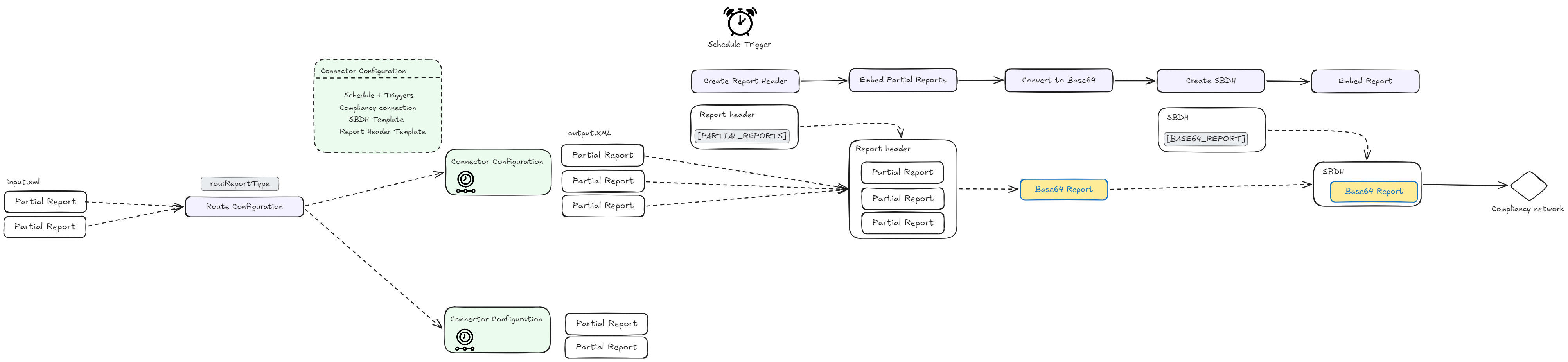
At a high level:
-
Partial reports are received by Routty Cloud.
-
Route Configuration determines the Connector Configuration.
-
Partial reports are stored under the selected Connector Configuration.
-
A configured schedule trigger initiates aggregation.
-
Routty Cloud generates the final report document.
-
Routty Cloud generates the final SBDH envelope.
-
The report is delivered through the configured compliance connection.
Generated reports & reprocessing
When a report trigger executes, Routty Cloud generates a new aggregated report document.
This aggregated report is stored as a normal Routty Cloud document and receives its own document identifier. As a result, the generated report can be:
-
Searched using the standard document search functionality.
-
Reviewed in the Routty Cloud portal.
-
Inspected for transmission status and processing history.
-
Reprocessed when required.
The generated report maintains a relationship to all partial reports that participated in the aggregation run through a shared outputBatchId.
The document classification is taken from the Output Format configured on the Report Type. If no Output Format is configured, the generated report inherits the output format and document type from the first partial report.
During aggregation Routty Cloud stores the generated Report Header, aggregated report and SBDH envelope as attachments on the generated report, such that each step can be reviewed.
Reprocessing
If an already generated report is reprocessed, Routty Cloud does not wait for the next configured reporting schedule.
Instead, the complete reporting workflow is executed immediately using the existing report identifier:
-
All partial reports linked through the report's
outputBatchIdare selected. -
The report is regenerated using the currently configured Report Header Template.
-
The SBDH document is regenerated using the currently configured SBDH Template.
-
The report is transmitted immediately using the configured Compliance Connection.
This allows configuration changes, mapping updates, or corrected routing settings to be applied without waiting for the next reporting period.
Note that reprocessing regenerates the report using the latest configuration. The regenerated output may therefore differ from the originally transmitted report if mappings, templates, or connector settings have changed since the original submission.
Automatic retry behaviour
After a report has been generated, Routty Cloud transmits the resulting document using the configured Compliance Connection.
Transmission failures can occur for various reasons, including:
-
Temporary network failures.
-
Endpoint unavailability.
-
Platform maintenance windows.
-
Transient authentication or connectivity issues.
To improve delivery reliability, Routty Cloud automatically retries failed transmissions.
Automatic Retries
Only delivery failures are retried automatically. Report generation, aggregation and template processing are not re-executed during a retry attempt.
Instead, Routty Cloud retries transmission of the already generated report document.
|
Attempt |
Delay |
|---|---|
|
Initial attempt |
Immediate |
|
Retry 1 |
1 hour |
|
Retry 2 |
2 hours |
|
Retry 3 |
4 hours |
|
Retry 4 |
8 hours |
|
Retry 5 |
24 hours |
Retries stop once the document is successfully delivered or the maximum retry count is reached.
Reprocessing vs Retry
Automatic retries and reprocessing serve different purposes:
|
Action |
Purpose |
|---|---|
|
Retry |
Re-attempt transmission of an already generated report |
|
Reprocessing |
Regenerate the report and execute the complete reporting workflow again |
A retry uses the original generated report.
A reprocessing operation regenerates the existing report document using the latest Connector Configuration, Report Type, Report Header Template and SBDH Template.
Compliance Feedback & Status Tracking
After a report has been transmitted, the compliance platform may return status updates, acknowledgements or validation errors.
These responses are associated with the generated aggregated report document and are recorded in its audit trail.
Aggregated Report Status
The generated report document represents the actual submission made to the compliance platform and therefore acts as the authoritative source for compliance status information.
Propagation to Partial Reports
Partial reports remain available as independent documents within Routty Cloud.
When feedback is received for an aggregated report, Routty Cloud updates the audit trail of all participating partial reports.
How to: Indirect e-Reporting
Partial reports can be submitted as normal UBL documents.
Once received, Routty Cloud:
-
Validates the partial report.
-
Evaluates routing metadata to determine the appropriate Connector Configuration.
-
Stores the report.
-
Waits for the next matching schedule trigger.
At trigger execution time:
-
All eligible partial reports assigned to the Connector Configuration are selected.
-
Partial reports are assigned to a shared
outputBatchID -
A report header is generated using the configured Report Header Template.
-
Partial reports are embedded into the generated report by replacing the
[PARTIAL_REPORTS]placeholder. -
The completed report is Base64 encoded.
-
An SBDH document is generated using the configured SBDH Template.
-
The encoded report is embedded by replacing the
[BASE64_REPORT]placeholder. -
The resulting SBDH document is transmitted using the configured Compliance Connection.
Examples
France Compliance
Since this component is initially created with FR compliancy in mind below are specifications that need to be followed for setting up FR compliancy
Report types France
|
Flow |
What you're reporting |
Who/What |
Report frequency |
|---|---|---|---|
|
10.1 |
Invoice data |
B2B international transactions |
Individual detail per invoice |
|
10.2 |
Payment data |
B2B international transactions where VAT > 0% B2B domestic transactions where VAT is due upon receipt of payment |
Individual detail per payment |
|
10.3 |
Invoice data |
B2C transactions |
Daily aggregates |
|
10.4 |
Payment data |
B2C transactions |
Daily aggregates |
Reporting schedules France
|
VAT regime |
Transaction Data - Period |
Transaction Data - Deadline |
Payment Data - Period |
Payment Data - Deadline |
|---|---|---|---|---|
|
Monthly normal |
10-day period (décade): 1-10, 11-20, 21-end of month |
10 days after period end: 20th, end of month, 10th of following month |
Monthly |
10th of following month |
|
Quarterly normal |
Monthly |
10th of following month |
Monthly |
10th of following month |
|
Simplified VAT |
Monthly |
Between 25th-30th of following month |
Monthly |
Between 25th-30th of following month |
|
VAT exemption scheme |
Bimonthly (every 2 months) |
Between 25th-30th of following month |
Bimonthly (every 2 months) |
Between 25th-30th of following month |
Report Header Templates
The Report Header Template generates the root <Report> and <ReportDocument> structure that is required by the destination compliance platform.
The template is executed once per aggregation run and receives the enriched-input.xml RouttyDocument of the first matched partial report as input. This allows sender, issuer and identification information to be derived dynamically from the submitted documents.
For France Flow 10 reporting, the Report Header Template is responsible for generating the complete report structure, including the reporting section wrapper.
For transaction reporting (Flows 10.1 and 10.3), the template would typically generate:
<Report>
    <ReportDocument>
        <Id>FLOW10-202510-00001</Id>
        <Name>FR Reporting October 2025</Name>

        <IssueDateTime>
            <DateTimeString>20251110120000</DateTimeString>
        </IssueDateTime>

        <TypeCode>IN</TypeCode>

        <Sender>
            <Id schemeId="0238">0004</Id>
            <Name>PDP_0004</Name>
            <RoleCode>WK</RoleCode>
        </Sender>

        <Issuer>
            <Id schemeId="0002">123456789</Id>
            <Name>Example Company</Name>
            <RoleCode>SE</RoleCode>

            <URIUniversalCommunication>
                <URIID>reporting@example.com</URIID>
            </URIUniversalCommunication>
        </Issuer>
    </ReportDocument>

    <TransactionsReport>
        <ReportPeriod>
          <StartDate>20251001</StartDate>
          <EndDate>20251031</EndDate>
        </ReportPeriod>
      [PARTIAL_REPORTS]
    </TransactionsReport>
</Report>
The placeholder:
[PARTIAL_REPORTS]
is replaced during aggregation with all collected partial reports.
Partial Report Structures
A Partial Report contains only the reportable business data. It does not contain the <Report> or <ReportDocument> elements.
Routty Cloud inserts the partial reports into the generated report header during aggregation.
Flow 10.1 – B2B International Transaction Report
A partial report for B2B international invoice reporting may contain a single <Invoice> element:
<Invoice>
    <ID>INV-2025-00001</ID>

    <IssueDate>20251001</IssueDate>

    <TypeCode>380</TypeCode>

    <CurrencyCode>EUR</CurrencyCode>

    <Seller>
        <CompanyId schemeId="0002">123456789</CompanyId>
        <PostalAddress>
            <CountryId>FR</CountryId>
        </PostalAddress>
    </Seller>

    <Buyer>
        <CompanyId schemeId="0002">987654321</CompanyId>

        <TaxRegistrationId qualifyingId="VAT">
            DE123456789
        </TaxRegistrationId>

        <PostalAddress>
            <CountryId>DE</CountryId>
        </PostalAddress>
    </Buyer>

    <MonetaryTotal>
        <TaxExclusiveAmount>1000.00</TaxExclusiveAmount>
        <TaxAmount CurrencyCode="EUR">0</TaxAmount>
    </MonetaryTotal>
</Invoice>
During aggregation, all matching invoice partial reports are inserted into a single:
<TransactionsReport>
    ...
</TransactionsReport>
section.
Flow 10.2 – B2B International Payment Report
Payment reporting may use a partial report containing a single invoice payment event:
<Invoice>

    <InvoiceID>INV-2025-00001</InvoiceID>

    <IssueDate>20251001</IssueDate>

    <Payment>

        <Date>20251015</Date>

        <SubTotals>
            <TaxPercent>0</TaxPercent>
            <CurrencyCode>EUR</CurrencyCode>
            <Amount>1000.00</Amount>
        </SubTotals>

    </Payment>

</Invoice>
During aggregation, all payment events are inserted into a single:
<PaymentsReport>
    ...
</PaymentsReport>
section.
Flow 10.3 – B2C Transaction Aggregate Report
For B2C reporting, a partial report may already represent a daily aggregate:
<Transactions>

    <Date>20251001</Date>

    <TransactionsCurrency>EUR</TransactionsCurrency>

    <CategoryCode>TLB1</CategoryCode>

    <TaxExclusiveAmount>10000</TaxExclusiveAmount>

    <TaxTotal>2000</TaxTotal>

    <TransactionsCount>100</TransactionsCount>

    <TaxSubtotal>
        <TaxPercent>20</TaxPercent>
        <TaxableAmount>10000</TaxableAmount>
        <TaxTotal>2000</TaxTotal>
    </TaxSubtotal>

</Transactions>
Multiple daily aggregates are collected into a single TransactionsReport.
Flow 10.4 – B2C Payment Aggregate Report
Payment aggregates can be submitted as:
<Transactions>

    <Payment>

        <Date>20251001</Date>

        <SubTotals>
            <TaxPercent>20</TaxPercent>
            <Amount>20000</Amount>
        </SubTotals>

    </Payment>

</Transactions>
These entries are aggregated into a single PaymentsReport.
Example Aggregation Result
Assume three partial reports were submitted:
<Invoice>...</Invoice>
<Invoice>...</Invoice>
<Invoice>...</Invoice>
Routty Cloud generates:
<Report>

    <ReportDocument>
        ...
    </ReportDocument>

    <TransactionsReport>

        <ReportPeriod>
            <StartDate>20251001</StartDate>
            <EndDate>20251031</EndDate>
        </ReportPeriod>

        <Invoice>...</Invoice>

        <Invoice>...</Invoice>

        <Invoice>...</Invoice>

    </TransactionsReport>

</Report>
The generated report is then:
-
Converted to Base64.
-
Embedded into the SBDH template by replacing:
[BASE64_REPORT]
-
Submitted through the configured Compliance Connection.
SBDH Template
The SBDH Template defines the Standard Business Document Header that wraps the generated compliance report before transmission to the configured Compliance Connection.
After Routty Cloud has generated the final report document:
-
The report XML is converted to Base64.
-
An SBDH document is generated using the configured SBDH Template.
-
The Base64 encoded report is embedded by replacing:
[BASE64_REPORT]
-
The completed SBDH document is transmitted to the compliance platform.
For France Flow 10 reporting, the generated SBDH contains mandate-specific routing information used by the receiving platform to identify the report type and reporting party.
Required Flow 10 SBDH Values
|
SBDH element |
Value |
Notes |
|---|---|---|
|
Sender.Identifier |
Your SIREN (9 digits) |
Authority="FR" |
|
DocumentIdentification.Standard |
urn.cpro.gouv.fr:1p0:ereporting |
Flow 10 schema |
|
DocumentIdentification.Type |
Flow10 |
Document type |
|
Scope: Country |
FR |
France |
|
Scope: CompanyCode |
Your SIREN |
Reporting party |
|
Scope: ProcessType |
Outbound |
Always outbound |
|
Scope: Mapping.OutputSchema |
Report |
Triggers e-reporting routing |
|
Scope: BusinessService.BusinessServiceName |
Reporting |
Distinguishes from e-invoicing |
|
Scope: Report.Type |
FR_Reporting_Flow10 |
Determines content type |
|
Scope: SenderDocumentId |
Unique report ID |
Recommend ERP reference |
|
Scope: SenderSystemId |
Your ERP system ID, defined during setup |
For example: "ERP_eReporting" |
A typical generated SBDH resembles:
<StandardBusinessDocumentHeader>
  <HeaderVersion>1.0</HeaderVersion>

  <Sender>
    <Identifier Authority="FR">123456789</Identifier>
  </Sender>

  <Receiver>
    <Identifier Authority="FR">FR_PLATFORM_OR_AUTHORITY</Identifier>
  </Receiver>

  <DocumentIdentification>
    <Standard>urn.cpro.gouv.fr:1p0:ereporting</Standard>
    <TypeVersion>1.0</TypeVersion>
    <InstanceIdentifier>ERP-FLOW10-2026-000001</InstanceIdentifier>
    <Type>Flow10</Type>
    <CreationDateAndTime>2026-06-09T10:00:00Z</CreationDateAndTime>
  </DocumentIdentification>

  <Scope>
    <Type>Country</Type>
    <InstanceIdentifier>FR</InstanceIdentifier>
  </Scope>

  <Scope>
    <Type>CompanyCode</Type>
    <InstanceIdentifier>123456789</InstanceIdentifier>
  </Scope>

  <Scope>
    <Type>ProcessType</Type>
    <InstanceIdentifier>Outbound</InstanceIdentifier>
  </Scope>

  <Scope>
    <Type>Mapping.OutputSchema</Type>
    <InstanceIdentifier>Report</InstanceIdentifier>
  </Scope>

  <Scope>
    <Type>BusinessService.BusinessServiceName</Type>
    <InstanceIdentifier>Reporting</InstanceIdentifier>
  </Scope>

  <Scope>
    <Type>Report.Type</Type>
    <InstanceIdentifier>FR_Reporting_Flow10</InstanceIdentifier>
  </Scope>

  <Scope>
    <Type>SenderDocumentId</Type>
    <InstanceIdentifier>ERP-FLOW10-2026-000001</InstanceIdentifier>
  </Scope>

  <Scope>
    <Type>SenderSystemId</Type>
    <InstanceIdentifier>ERP_eReporting</InstanceIdentifier>
  </Scope>

  <SovosDocument>
    <SovosLegalDocument>
      <Base64Document>
        <EmbeddedDocument fileName="report_flow10.xml" mimeCode="application/xml">[BASE64_REPORT]</EmbeddedDocument>
      </Base64Document>
    </SovosLegalDocument>
  </SovosDocument>
</StandardBusinessDocumentHeader>
The generated report is embedded into the SBDH payload through the configured template mapping using the [BASE64_REPORT] placeholder.
The resulting document is the payload that is transmitted to the compliance platform.