

Dynatos must facilitate an identity verification process for each customer Routty onboards for the French e-Invoicing Mandate, using Sovos as the Agreed Platfrom (Plateforme Agréée, PA). These steps are required under French law. They apply whether onboarding during the pilot or ahead of the mandatory 1 September 2026 go-live.
1. Electronic Address for receiving invoices
Each of our customers in scope must have at least one electronic address registered in the French Central Directory. This is how their suppliers route e-invoices to them. Without it, they cannot receive e-invoices from 1 September 2026.
For full details and guidance, please see section 1.4.5 of tax authority documentation XP Z12-014.
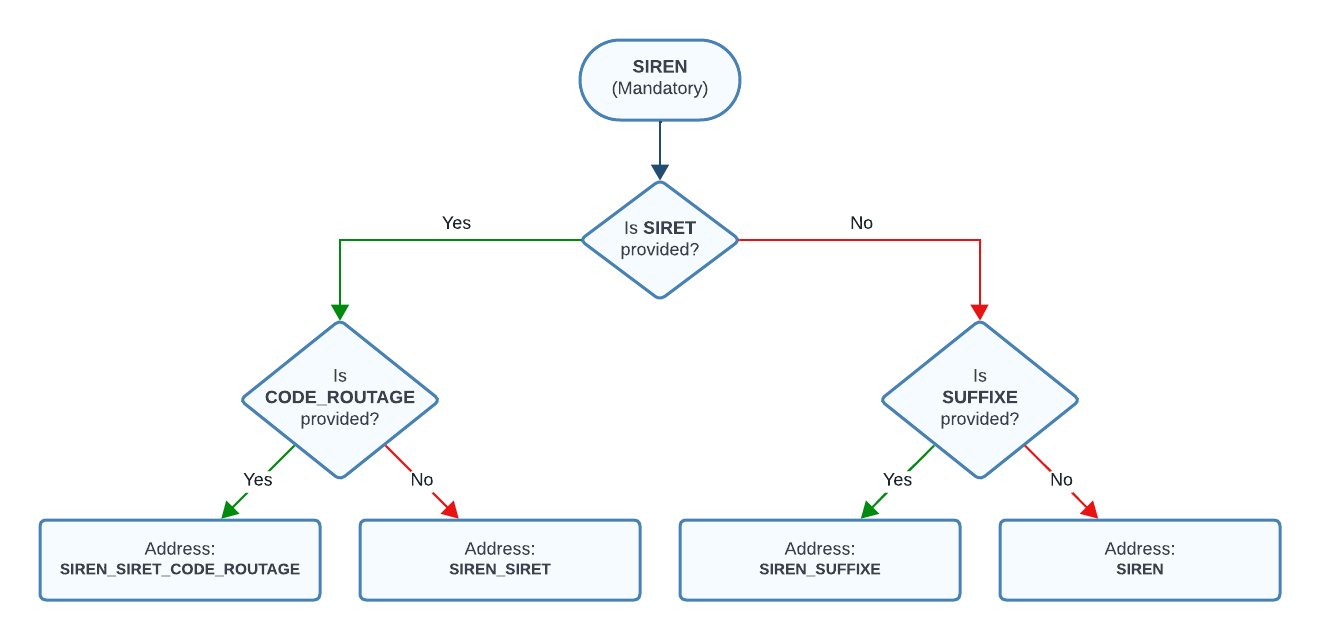
Electronic addresses are based on the SIREN/SIRET number and take one of four formats:
|
Format |
Description / When to use |
|
SIREN (9 digits) |
Default entry. Suitable for most companies. |
|
SIREN_SIRET (9+5 digits) |
Use when invoices need routing to a specific establishment of a single Legal Entity (e.g. head office vs. other premises). |
|
SIREN_SIRET_ROUTING CODE |
9+5 digits plus an identifier (e.g. a GLN). Use when invoices need routing to a specific department. |
|
SIREN_SUFFIX |
9 digits plus a custom string. Use to segregate invoice flows within an organization. |
Address generation flowchart
Follow this process to determine your address format:
About the Central Directory - what you may already see
If you search for a company at https://facturation.chorus-pro.gouv.fr/annuaire/#/ you may already see a basic entry. This is normal - the French tax authority pre-populates entries using official company registers.
A default entry does not mean our customers are ready to receive e-invoices. If supporting the inbound flow, Sovos (PA) must register as their designated receiving platform and configure their electronic address. This can only happen once the legal steps below are complete.
As the Certified Receiving Platform (Plateforme Agréée, PA), Sovos will register each address on our customer’s behalf. Each customer must make three decisions first:
|
Decision |
What the end user needs to confirm |
|
How do they want to receive invoices? |
Confirm the electronic address(es) they want to use.
|
|
Have they told their suppliers? |
Once the address is confirmed, it must be shared with suppliers. It is a mandatory field on every e-invoice. |
|
Are they collecting customers' addresses? |
If you are also sending invoices (Outbound), you must include their customers' electronic addresses on every invoice.
|
2. Why Identity Verification is required
French law requires every Certified Receiving Platform to verify the identity and legal authority of every company before granting access to e-invoicing services. It applies regardless of which platform an end user chooses.
For all flows (inbound/outbound/eReporting), it is necessary to verify identity.
For every company Routty onboards, their Legal Representative must complete two mandatory steps:
|
# |
Requirement |
What this involves |
|
1 |
Identity Verification |
The end user's Legal Representative uploads a valid ID document (passport, identity card or residence permit) via a secure link. Sovos verifies their authority against the French company register (Infogreffe/INSEE) using the SIREN number. |
|
2 |
Documentation |
The Legal Representative must acknowledge two documents: Identity Validation Terms & Conditions - required for all end users Opt-In Form (referred to as the ‘mandate’ in the Terms & Conditions) - required only if the end user is using Sovos for Inbound (receiving invoices). This authorizes Sovos to register their address in the Central Directory.
|
About Legal Representative
The Legal Representative is the person formally authorized to act on behalf of the Company - typically the CEO, Managing Director, or someone with delegated signing authority.
It cannot be substituted at the ID verification or document signing stages. An administrative delegate (Registrant User) may prepare information on their behalf, but the Legal Representative must personally upload their ID and sign the required document.
3. Current process: Onboarding
Interim - until Automated Onboarding Portal by Sovos
The process described in this section is an interim solution for onboarding. It involves direct coordination between our customer, Dynatos, and the Sovos Professional Services team.
-
An automated partner portal will replace this approach in the next months
We collect the required information from our tenants and submit it via the link Routty Identity Validation Form . Sovos Professional Services team coordinates the validation journey on our behalf.
|
Step |
Action |
Details |
|---|---|---|
|
1 |
You collect and submit end user information |
Gather the required information in 4 from your tenants and submit it via the link provided. |
|
2 |
Sovos PS reviews and prepares the onboarding file |
Sovos PS team reviews the submission and confirms the correct validation journey (standard, delegated, KBis or international). They prepare the onboarding file and submit it to their identity validation coordinator. No action is needed from you or the end user at this stage. |
|
3 |
End user's Legal Representative receives a secure email |
Sovos identity validation partner (CRYPTOLOG INTERNATIONAL - Universign) sends a secure email directly to the Legal Representative (or Registrant User first, if one has been designated). They click the link, upload their ID, and only when Inbound, sign the Opt-In form. The electronic address is confirmed at this point via the Opt-In Form. Please brief your end users to expect this email. |
|
4 |
Sovos PS activates the end user's platform access |
Once validation is confirmed, Sovos PS manually provisions the end user on the platform and, where applicable, registers their electronic address in the French Central Directory via the PPF. Routty will be notified when activation is complete. If validation is rejected, Sovos PS will contact Routty directly to resolve it and restart. |
4. Information required for each End User
Whether using the manual process or the automated portal, the same core information is required for each end user. Please collect this before initiating onboarding.
|
Information |
Required? |
Why it is needed |
|
End user company SIREN number (9-digit French identifier) |
Yes |
Retrieves Legal Representative data automatically from the French company register (Infogreffe/INSEE). |
|
End user Business Legal Name (as registered with INSEE) |
Yes |
Must match official records exactly - used in all legal documents. |
|
Legal Representative: full name, email address, mobile phone number |
Yes |
Required to trigger the identity validation invitation and one-time verification codes. |
|
Legal Representative: country of ID document (nationality) |
Yes |
The validation system must be configured for this country in advance. |
|
Legal Representative: preferred language (English or French) |
Yes |
Verification emails and the interface are delivered in the chosen language. |
|
Products in scope: Inbound / Outbound / eReporting |
Yes |
Determines which documents are required (e.g. whether the Opt-In Form applies). |
|
End user's chosen electronic address(es) |
If Inbound |
Required to complete the Opt-In Form and register the address in the Central Directory. |
|
Registrant User details (if Legal Rep is delegating): name, email, mobile phone, preferred language |
If applicable |
Needed if the Legal Representative wants an administrative contact to prepare forms on their behalf. |
|
KBis document |
If applicable |
Required only if the end user's company is marked 'non-diffusible' (not publicly listed in Infogreffe). |
Action required: For each end user you are onboarding via the manual process, submit the information using the Routty Identity Validation Form/
Or return the information using this document FR Mandate_EU_Identity Verification & Central Directory Registration Guide_V1_11.05.26..docx
4.1 Configure the Connector Configuration in Routty
After collecting the required onboarding information, the Connector Configuration must be created in Routty for the tenant.
Steps
-
In Routty, navigate to:
Tenants → Select the relevant Tenant → Connector Config
-
Click Create
-
In the connector selection list, choose:
France Output Outbound - SOVOS
-
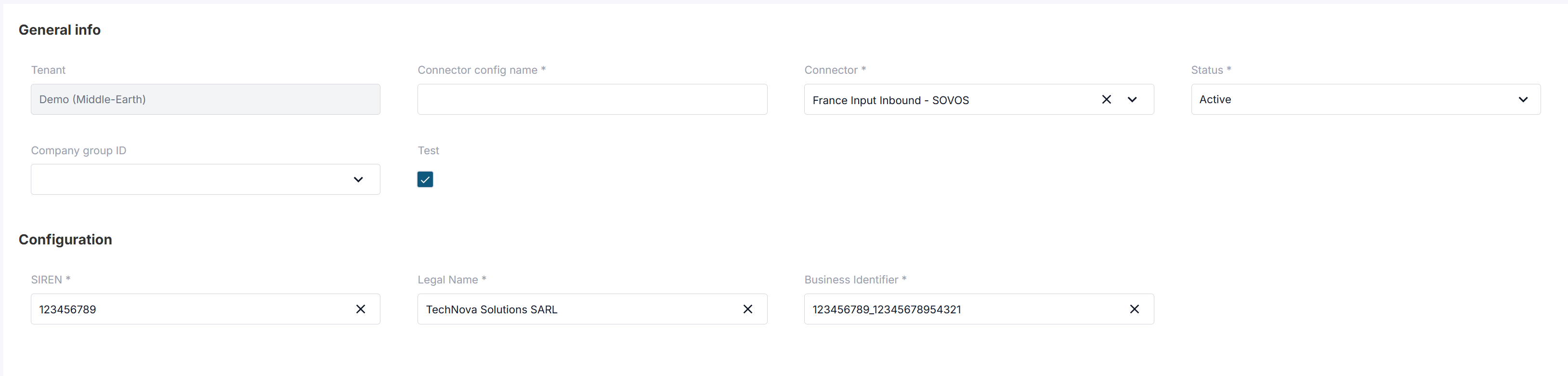
Complete the following mandatory fields:
|
Field |
What should be filled in |
Example |
|---|---|---|
|
SIREN |
The 9-digit French company identifier (SIREN). This is the primary company identifier used for French e-invoicing and electronic address creation. |
|
|
Legal Name |
The official registered company name exactly as registered with INSEE / company registry. |
|
|
Business Identifier |
One or more electronic address identifiers used to create company endpoints in the Peppol network. These identifiers define how invoices are routed. Multiple identifiers can be provided and must be separated by For example: |
|
-
Click Create Configuration
5. What our Customers need to know
Please brief your customer on the following before initiating the process:
|
Topic |
What to tell your end user |
|
Why they are receiving an email from the validation partner |
It is part of the mandatory French e-invoicing onboarding process. It is not spam. The Legal Representative must act on it promptly. |
|
Who must complete it |
The Legal Representative personally - not an admin or PA on their behalf. An administrative delegate (Registrant User) may prepare information, but the Legal Representative must complete the ID upload and sign the opt-in form (if relevant). |
|
What they will be asked to do |
Upload a valid ID document (passport, national identity card or residence permit) and sign, if applicable, the Opt-In Form. |
|
How long it takes |
Approximately 10-15 minutes once they have their ID document to hand. |
|
What happens if they do not act |
Their platform access cannot be activated. They will not be able to send or receive e-invoices via Sovos from September 2026. |
Frequently Asked Questions
Does identity validation apply regardless of whether we are doing inbound, outbound or eReporting?
Yes. Identity validation is required for all customers irrespective of scope.
The only difference is that the opt-in form (the mandate signed during the Vialink process) is required only if you are using Sovos for inbound (receiving invoices)
Do we need to complete the registration process for the test environment as well?
No. You can start testing without completing the registration process, because the test environment does not connect through the government platform.
The registration and identity validation process is only required for the production environment.
We have multiple Legal Representatives for our company. Do we need to provide details for all of them?
No. You only need to select and provide details for one Legal Representative per legal entity.
We have multiple legal entities. Do we need to run this process for each one?
Yes. The process must be completed for each legal entity before we can grant access to PA services (Inbound, Outbound and/or eReporting).