
Import Details
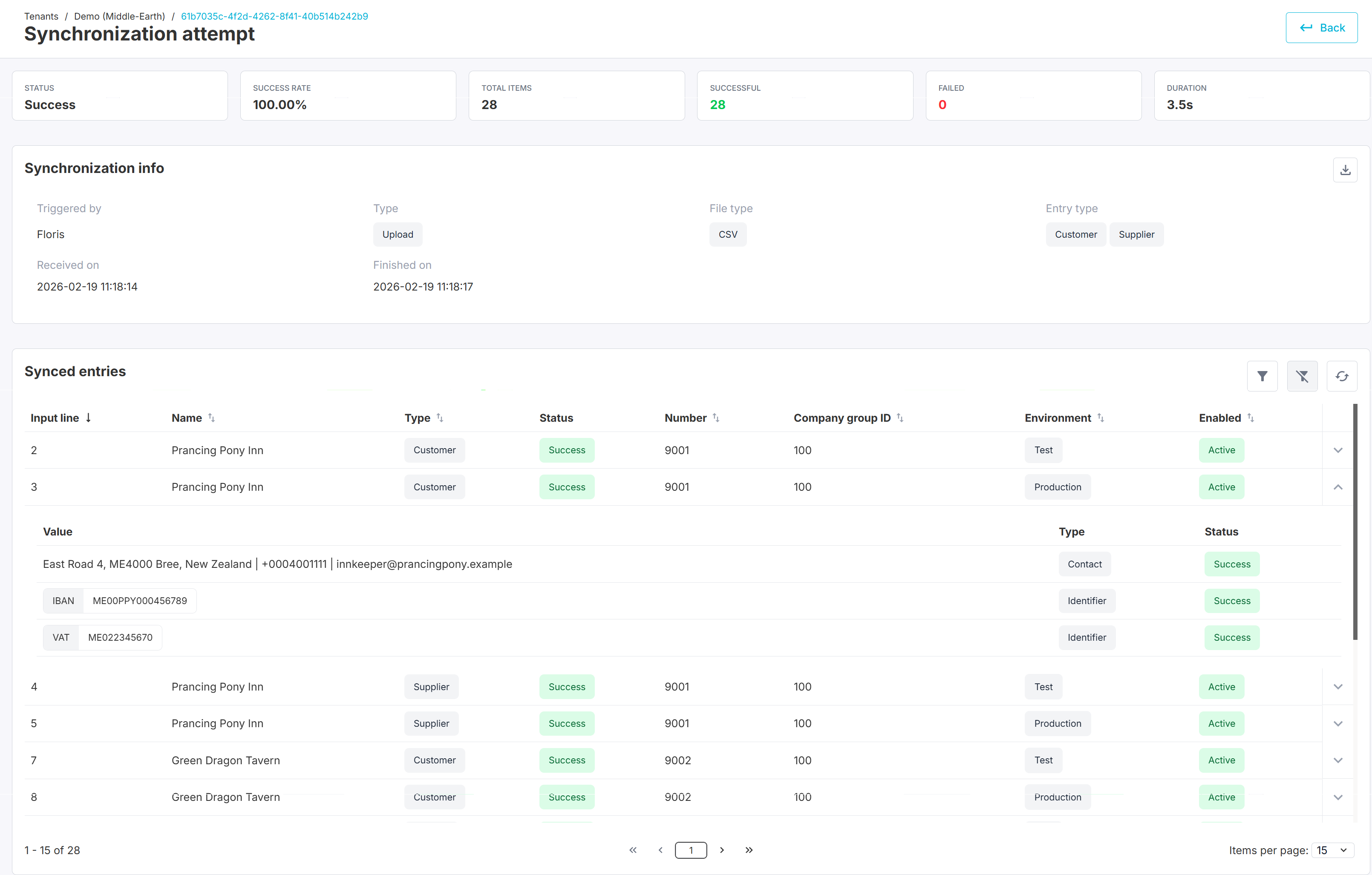
The Import Details page provides a complete breakdown of a single master data import attempt.
This page allows users to review processing results at both summary and individual record level, including validation outcomes and environment-specific behavior.
Location:
Tenant → Import → Select an import
Import Summary
At the top of the page, a summary section provides a high-level overview of the selected import attempt.
Overview Metrics
Field | Description |
|---|---|
Status | Overall result of the import (e.g., Success, Failed) |
Success rate | Percentage of successfully processed records |
Total items | Total number of processed records |
Successful | Number of successfully processed records |
Failed | Number of failed records |
Duration | Total processing time |
This section allows quick evaluation of the import outcome.
Synchronization Information
The Synchronization info section provides contextual information about the import.
Field | Description |
|---|---|
Triggered by | User who initiated the import |
Type | Submission method (e.g., Upload) |
File type | File format (e.g., CSV) |
Entry type | Master data types included (Customer, Supplier, Company) |
Received on | Date and time the import was submitted |
Finished on | Date and time processing completed |
A result file can be downloaded from this section for offline analysis.
Synced Entries
The Synced entries section provides a detailed, line-by-line breakdown of all processed records.
Each row represents one imported entry.
Columns
Column | Description |
|---|
Column | Description |
|---|---|
Input line | Line number from the original import file |
Name | Name of the master data entity |
Type | Entity type (Customer / Supplier / Company) |
Status | Processing result for this specific entry |
Number | Assigned or matched entity number |
Company group ID | Associated company group |
Environment | Target environment (Test / Production) |
Enabled | Indicates whether the record is active |
Entry Details (Expandable View)
Each synced entry can be expanded to show detailed field-level information.
This includes:
Contact information (e.g., address, email, phone)
Identifiers (e.g., VAT number, IBAN)
Validation results per field
Status per data element
Each field displays:
Type (e.g., Contact, Identifier)
Processing status
Whether import succeeded or failed